Captions vs InVideo: Credit Plans Side by Side
Captions sells 500 credits for $24.99 and 5,600 for $279.99, which works out at the same price per credit on both. InVideo cuts the per-credit price as the tier rises but says unused credits never carry over. Figures from both pricing pages on October 11, 2026.
This article is a documentation review: it is based on the vendors' own published pages, checked on the date shown. We may earn a commission from some links; it never affects what we recommend.
Captions and InVideo both sell short-form AI video in credits, and both publish a rate card. The pricing logic underneath is opposite. Captions charges the same amount per credit on every paid tier and lets unused credits accumulate up to three times the monthly allowance. InVideo discounts credits heavily as the tier rises and states that nothing rolls over. This comparison uses the two vendors' own pricing pages and the Captions credit documentation, all read on October 11, 2026, and marks our own arithmetic where it appears.
The short answer
- Captions suits uneven workloads, because rollover is published and capped at three times the monthly allowance from the Basic tier up.
- InVideo suits steady, heavy use, because the per-credit price falls sharply at higher tiers and on annual billing.
- InVideo is the cheaper entry point at $9 a seat monthly or $4 a seat on annual billing, against $24.99 for the cheapest Captions tier shown on its pricing page.
This is a documentation comparison based on published pages, not a trial of either app. Where a figure comes from our own division, the text says so.
Captions keeps the per-credit price flat; InVideo discounts it
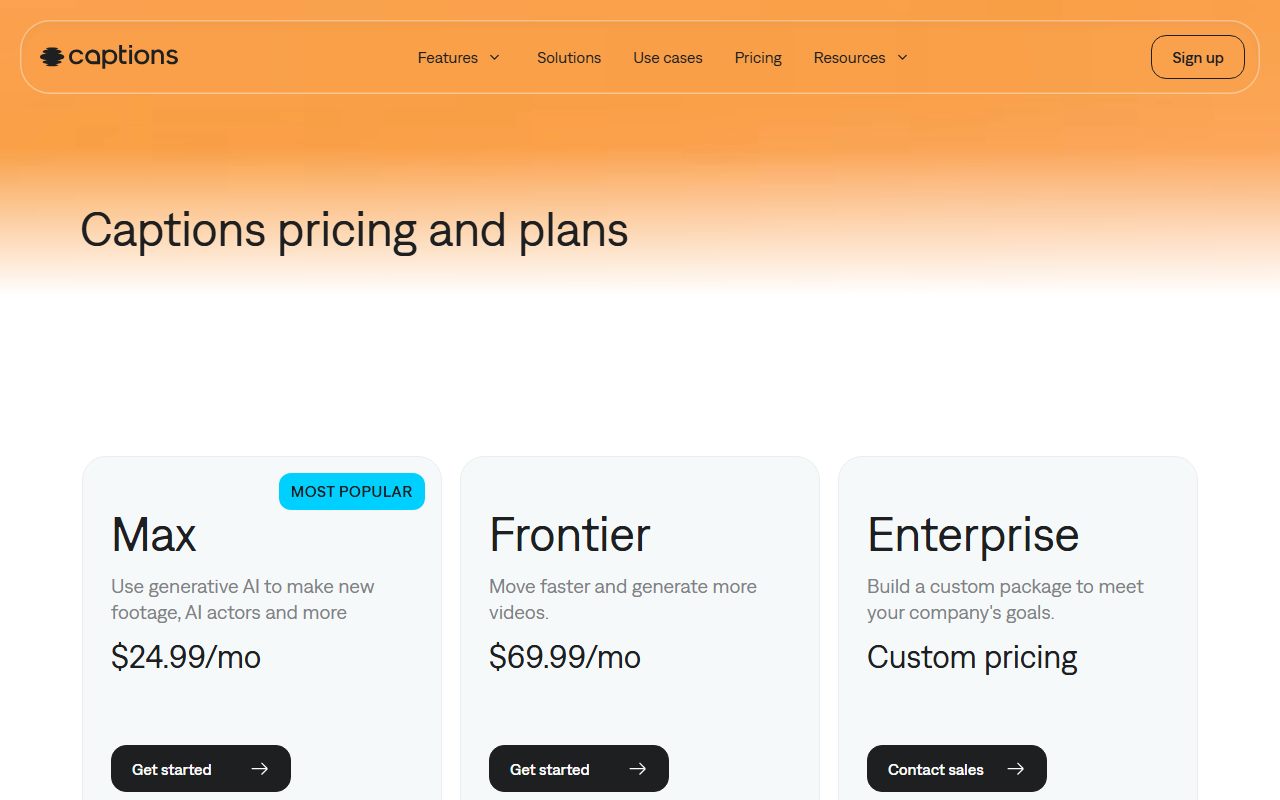
The Captions pricing page lists Free at no cost, Max at $24.99 a month with 500 credits, Frontier 1x at $69.99 with 1,400, Frontier 2x at $139.99 with 2,800 and Frontier 4x at $279.99 with 5,600.
Divide price by credits on each of those four tiers and the answer is the same every time: about 5 cents a credit. That is our arithmetic on the published figures, and it means volume buys speed and capacity at Captions, not a discount.
The InVideo pricing page prices Basic at $9 per seat monthly or $4 on annual billing with 190 credits, Pro at $30 or $15 with 1,000 credits, and Ultra at $80 or $40 with 3,000 credits.
Our arithmetic on those numbers: Basic costs about 4.7 cents a credit monthly, Pro about 3 cents and Ultra about 2.7 cents. On annual billing Ultra falls to roughly 1.3 cents, a drop of around 72 percent against Basic monthly.
InVideo flags this on the page itself, labelling Ultra "60% CHEAPER" per credit. Captions makes no such claim, which is consistent with the flat rate we calculated.
The two rate cards do not measure the same thing
Captions publishes its burn rates in the help centre credits page. Prompt to Video costs "16 credits every 6 seconds". An AI Edit costs 10 to 40 credits. A GenAI Video costs 1 to 20 credits.
Model-specific examples on the same page: Google Veo 3 costs 64 credits for 4 seconds, Kling 2.1 costs 140 credits and Sora 2 costs 16 credits, read October 11, 2026.
InVideo converts differently, into generations rather than seconds. Its page describes 190 credits as roughly 76 Nano Banana Pro image generations or about 7 Seedance 2 videos, and 3,000 credits as about 1,200 images or 78 videos.
So Captions tells you the cost of a second; InVideo tells you the count of clips. Neither is wrong, and neither is directly comparable without converting, the problem described in how to read an AI credit pricing page.
Convert both allowances into finished clips
Using the published rates, here is what each entry tier produces. The Captions figures are our division of its stated rates; the InVideo figures are the vendor's own estimates.
- Captions Max, 500 credits: about 187 seconds of Prompt to Video at 16 credits per 6 seconds, roughly three minutes (our arithmetic).
- Captions Max, 500 credits spent on Google Veo 3 instead: about 7 clips of 4 seconds, roughly 31 seconds of output (our arithmetic).
- Captions Frontier 4x, 5,600 credits: about 2,100 seconds of Prompt to Video, roughly 35 minutes (our arithmetic).
- InVideo Basic, 190 credits per seat: about 7 Seedance 2 videos or 76 Nano Banana Pro images, per InVideo's page.
- InVideo Ultra, 3,000 credits per seat: about 78 Seedance 2 videos or 1,200 images, per InVideo's page.
The gap between three minutes and 31 seconds on the same 500 credits is the whole point. Model choice, not plan choice, decides how far an allowance goes.
Avatar tools behave the same way. HeyGen's own rate card runs from 4 to 48 credits a minute depending on the avatar model, as set out in Runway against HeyGen.
Rollover is the clearest difference between them
Captions publishes a carry-over rule. Rollover applies from the Basic tier up, capped at three times the monthly allowance, described as the current month plus up to two months in rollover.
The same page sets out the edges: downgrading reduces the balance to the new plan's cap and forfeits the excess, upgrading leaves existing credits untouched, and cancelling forfeits everything at the end of the period.
InVideo states the opposite in one line: unused credits do not roll over to the next month. A seat that goes quiet for three weeks loses that allowance outright.
That makes the cheaper per-credit price conditional. InVideo is cheaper per credit only on credits actually spent, which is the same conditional that applies to Runway's non-rolling Standard and Pro tiers.
Seats, platforms and the fine print
InVideo prices per seat and adds guest seats: 10 free guest seats on Pro and 20 on Ultra, each carrying 190 credits, per its pricing page on October 11, 2026.
Captions does not publish a per-seat rate on its pricing page. It carries a different caveat instead: "All prices displayed in USD. Features and prices reflect iOS plans only."
That line is easy to miss and material. A buyer on desktop or Android cannot assume the $24.99 figure applies, and we found no equivalent table for other platforms on the page we read.
There is also a naming mismatch at Captions. The help centre lists a Basic tier with 200 credits a month, while the pricing page we read shows Free, Max and three Frontier tiers with no Basic card.
Mismatches like that are routine in fast-moving AI catalogues. Where two vendor pages disagree, price from the one that charges you, the rule applied in the Claude plan comparison as well.
Choose Captions if, choose InVideo if
- Choose Captions if output arrives in bursts, since rollover up to three times the monthly allowance is published.
- Choose Captions if you work on iOS and want a per-second rate card you can price a job against before paying.
- Choose InVideo if several people need their own allowance, because credits are quoted per seat and guest seats carry 190 credits each.
- Choose InVideo if usage is steady and high, where Ultra on annual billing lands near 1.3 cents a credit on our arithmetic.
- Choose neither on price alone if the work needs frontier models, since a single Kling 2.1 generation costs 140 credits at Captions.
Bottom line
Captions sells predictability: one price per credit, a published rollover cap and a per-second rate card. InVideo sells volume: much cheaper credits at the top tiers, with nothing carried forward.
Price both on credits you will genuinely spend in a month, then check the platform caveat at Captions and the no-rollover line at InVideo before committing.
All figures reflect vendor pages read on October 11, 2026. For the unit-by-unit method see how AI writing credits work, and for a prompt-metered contrast see Grammarly Free against Pro.
Frequently asked questions
Which is cheaper, Captions or InVideo?
InVideo, on entry price and per credit. Its Basic seat is $9 monthly or $4 on annual billing against $24.99 for the cheapest Captions tier on its pricing page, checked October 11, 2026.
Do Captions credits roll over?
Yes, from the Basic tier up, capped at three times the monthly allowance. Downgrading cuts the balance to the new cap and forfeits the excess; cancelling forfeits the balance at period end.
Do InVideo credits roll over?
No. The InVideo pricing page states that unused credits do not roll over to the next month, so a plan has to be sized for the quietest month rather than the busiest one.
How many credits does a Captions video cost?
Prompt to Video costs 16 credits every 6 seconds, an AI Edit 10 to 40 credits, and a Google Veo 3 clip 64 credits for 4 seconds, per the Captions credits documentation on October 11, 2026.
Does Captions pricing apply outside iOS?
The pricing page states that features and prices reflect iOS plans only. We found no equivalent table for other platforms on that page, so confirm desktop or Android pricing with Captions directly.
Sources
- Captions pricing page (checked Oct 11, 2026)
- Captions help centre: understanding credits and AI usage (checked Oct 11, 2026)
- InVideo pricing page (checked Oct 11, 2026)
- Runway pricing page (rollover comparison) (checked Oct 11, 2026)