Browse AI Credits: What One Page Scrape Really Costs
Most AI pricing pages sell credits without saying what a credit does. Browse AI says it in one sentence: one page is one credit, ten rows of data is one credit, and you pay whichever is more. It also publishes a cost per credit for every tier, and a top up rate that sits far closer to the subscription rate than rivals manage. Page read October 15, 2026.
This article is a documentation review: it is based on the vendors' own published pages, checked on the date shown. We may earn a commission from some links; it never affects what we recommend.
Browse AI does what almost no AI vendor does on a pricing page: it defines its unit in a sentence a buyer can use. "One page is one credit. Ten rows of data is one credit. You pay whichever is more." It also publishes a cost per credit for every tier, a top up rate for every tier, and a worked example of what 100 credits buys. Official pricing page read October 15, 2026.
The credit rule is printed in full, with a worked example
The pricing FAQ states it outright: "One page is one credit. Ten rows of data is one credit. You pay whichever is more, so a list page with 50 products costs 5 credits, and a page that returns two fields still costs 1."
The same answer adds a cost preview: "Every run shows its cost in your dashboard before it goes." That is the single most useful sentence on any credit page we have read in this category.
A panel higher up sets out what 100 credits buys four ways: "1,000 rows from list pages," "100 standard pages," "100 screenshots," or "1 to 10 premium pages." A row is defined as "one item: a product, a listing, a job posting."
Premium sites carry their own band. The comparison table lists "2 to 10 credits / run" for them, and the page names Amazon and Ebay as examples because they "need residential proxies (thus cost more)."
Compare that with the tools in how AI credits work at Jasper, Copy.ai, Synthesia and Pictory, where the credit totals are printed but the unit behind them is not. Browse AI is the counter example that shows it can be done.
Every tier publishes its own cost per credit
The comparison table carries a row most vendors omit entirely, headed "Cost per credit." It reads "$0.019" for Personal, "$0.014 to $0.011" for Professional and "Custom" for Premium.
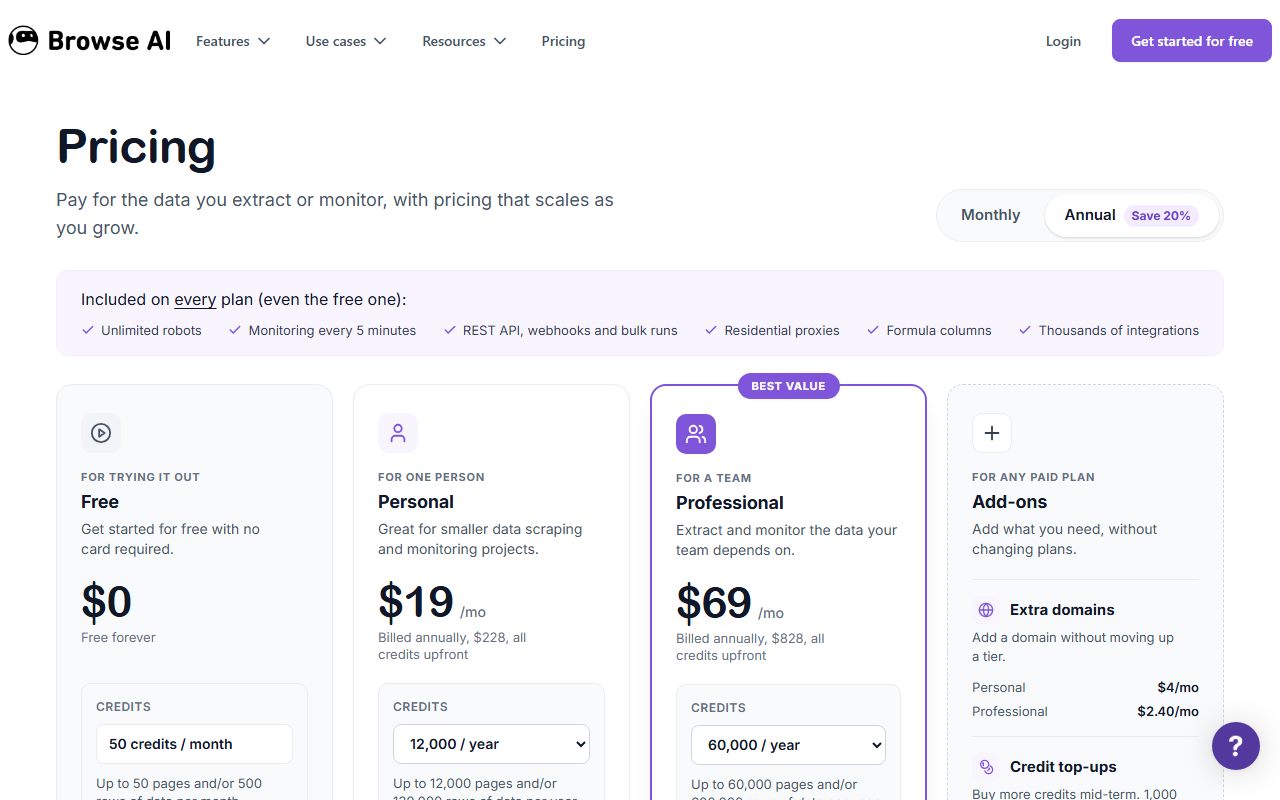
Those figures check out against the plan cards. Personal lists "$19 /mo" with "Billed annually, $228, all credits upfront" and "12,000 / year," which is $0.019 a credit by editorial calculation.
Professional lists "$69 /mo" with "Billed annually, $828" and "60,000 / year," which works out to about $0.0138 a credit, matching the "$0.014" the table prints.
Premium is quoted differently: "Starting at $500 a month billed annually," with volume "priced to what you actually use, from $0.010 a credit" and a stated "98% data-accuracy SLA."
A published floor price per credit is unusual. For how video vendors handle the same question, see Runway and HeyGen.
- Free: $0, "Free forever", 50 credits a month, described as "Up to 50 pages and/or 500 rows of data per month", 2 domains, self support, no card required.
- Personal: $19 a month billed annually at $228 with all credits upfront, 12,000 credits a year rising to 24,000, 5 domains, 3 team members, standard support.
- Professional: $69 a month billed annually at $828, 60,000 credits a year rising to 360,000, 10 domains, 10 team members, priority email support.
- Premium: from $500 a month billed annually, custom credits and domains, dedicated account manager, 98 percent data accuracy SLA, credits from $0.010.
- On every plan, even free: unlimited robots, REST API, webhooks, bulk runs, residential proxies, formula columns and integrations with Google Sheets, Airtable, Zapier, Make and Pabbly.
- Add-ons: extra domains at $4 a month on Personal and $2.40 on Professional; credit top ups with a 1,000 credit minimum, annual plans only; setup and onboarding from $399.
The top up rate is the fairest we have seen
Browse AI lists "$0.024 per credit on annual plans" for Personal against a subscription rate of $0.019. By editorial calculation that is a premium of about 26 percent, not a multiple.
On Professional the top up band is "$0.017 to $0.013 per credit on annual plans" against a subscription rate of $0.014 to $0.011. At volume the top up low end is within a fifth of a cent of the plan rate.
For context, the audio and video tools in ElevenLabs and Descript and Captions and InVideo sell packs at multiples of their plan rate. A 26 percent premium is a different pricing decision.
One restriction applies. The table marks credit top ups "Annual plans only," with a "1,000 credit minimum," so monthly subscribers cannot buy their way out of a shortfall at all.
Monthly billing costs far more than the badge suggests
The billing toggle carries a badge reading "Annual Save 20%." On Professional that holds: the monthly column header reads "$87 Per month" against "$69" annually, which is about 20.7 percent.
On Personal it does not. The monthly column header reads "$48 Per month" against "$19" on annual billing, which is about 60 percent off by editorial calculation, three times what the badge claims.
The top up rate moves with the term too. The page swaps in "$0.030 per credit" for monthly Personal and "$0.022 to $0.017 per credit" for monthly Professional, against $0.024 and $0.017 to $0.013 on annual.
Annual billing also changes delivery. Both paid cards state "all credits upfront," so the year's allowance is available immediately, one of the term traps listed in how to read an AI credit pricing page.
What the page does not answer
Rollover is the gap. The pricing FAQ lists the question "Do unused credits roll over?" but the answer sits in a collapsed panel that did not render when we read the page on October 15, 2026, so we cannot report it.
Monitoring frequency is stated twice and differently. The banner of features included on every plan says "Monitoring every 5 minutes," while the comparison table row reads "Every minute."
Deep scraping has no published credit formula. The table describes it as chaining robots "so one follows the links another captures," and the FAQ asks why a deep scrape cost more than expected, but that answer was also collapsed.
Two limits do carry numbers: "Max task run time 60 minutes" and "Data retention 90 days." A domain is also defined generously, since the table counts "company.com/pricing, help.company.com and jobs.company.com" as one.
How to size a plan before you buy
Start from rows, not pages, because rows are what most projects actually need. Ten rows is one credit, so a 10,000 row dataset costs 1,000 credits whatever the page count.
- Count the list pages you need and multiply rows by 0.1 to get credits, then take the larger of that and your page count.
- Add a premium multiplier of 2 to 10 for any site the page flags as needing residential proxies, such as the marketplaces it names.
- Multiply by your monitoring frequency, because the page states 1 credit for every time a standard page is scraped or monitored, not only on first capture.
- Check your domain count against the cap of 2, 5 or 10, since extra domains cost $4 or $2.40 a month rather than forcing a tier upgrade.
- Stay annual if you expect to overrun, because top ups are annual only and the Personal annual rate is about 60 percent below its monthly rate.
The free 50 credits are enough to test that arithmetic on a real target site. That is a more useful free tier than the sampling plans in Otter and Fathom and Grammarly.
Frequently asked questions
What does one Browse AI credit buy?
One standard page scrape or monitor, or ten rows of extracted data, whichever is larger. The page gives the example that a list page with 50 products costs 5 credits, per the page read October 15, 2026.
How much is a credit in dollars?
The page publishes $0.019 on Personal and $0.014 to $0.011 on Professional. Premium is custom, quoted from $0.010 a credit. Those figures match the plan prices by editorial calculation.
Is the free plan usable or just a demo?
It covers 50 credits a month, stated as up to 50 pages or 500 rows, with 2 domains and no card required. Unlimited robots, the REST API and residential proxies are included on every plan.
Why do Amazon and Ebay cost more?
The page says those sites need residential proxies, so they are billed as premium pages at 2 to 10 credits a run rather than one credit a page.
Can I buy extra credits mid month?
Only on annual plans, with a 1,000 credit minimum. Personal top ups are listed at $0.024 a credit against a plan rate of $0.019, a premium of about 26 percent.
Do unused credits roll over?
The pricing FAQ asks the question but the answer was inside a collapsed panel that did not render when we read the page on October 15, 2026, so we cannot report what it says.
Bottom line
Browse AI is the rare case where the pricing page answers the only question that matters. A page is a credit, ten rows is a credit, you pay the larger, and the dashboard shows the cost before the run.
The gaps that remain are rollover and the deep scrape formula, both behind collapsed panels. Everything else a buyer needs to budget is printed, including a top up premium of about a quarter. All figures as of October 15, 2026.
Sources
- Browse AI pricing, plan prices, cost per credit, credit definition and add-on rates (checked Oct 15, 2026)