Image AI Credits: One Photo or One Attempt?
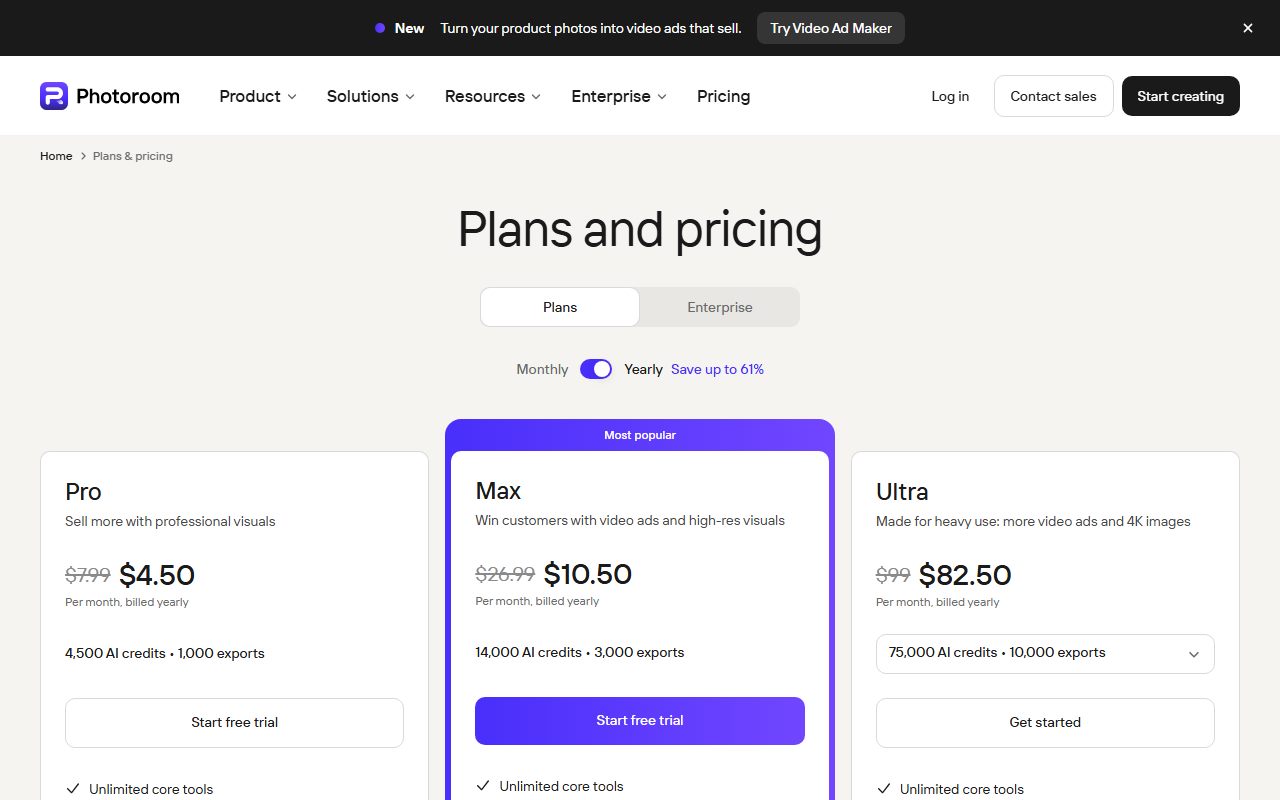
Photoroom's pricing page gives its Pro plan 4,500 AI credits in one place and 8,000 in another, and two different prices to go with them. Topaz shows its Pro tier at both $75 and $79 a month. remove.bg no longer lists a price at all and closes its standalone site on December 1, 2026. Pages read November 3, 2026.
This article is a documentation review: it is based on the vendors' own published pages, checked on the date shown. We may earn a commission from some links; it never affects what we recommend.

An image credit is supposed to be the simplest unit in AI pricing. One photo, one credit. On the four pages read for this piece, not one vendor made it that simple, and two could not even agree with themselves.
Two of the four print contradictory figures on the same page. One has stopped printing prices at all. Only the smallest of them states plainly that one image equals one credit.
Four image tool pricing pages were read on November 3, 2026. A fifth, Picsart, returned a Cloudflare challenge and contributes nothing here.
Photoroom gives its Pro plan two different credit allowances
The plan cards at the top of the Photoroom pricing page and the comparison table further down the same page do not match. Both were read in the same page source on the same day.
- Plan cards, yearly toggle selected: Pro at $4.50 a month with "4,500 AI credits", Max at $10.50 with "14,000 AI credits", Ultra at $82.50 with "75,000 AI credits".
- Comparison table, same page: Pro at $7.50 a month with 8,000 AI credits a month, Max at $20.99 with 25,000, Ultra at $82.50 with 75,000.
- Structured data, same page: Pro $12.99 monthly or $89.99 yearly, Max $34.99 or $250.00, Ultra $99.00 or $990.00.
- Export allowances agree across both tables at 1,000, 3,000 and 10,000 a month.
The page offers one explanation for part of it. A footnote reads "Prices displayed in US Dollar (Vietnam)", and the credit FAQ says the monthly credit amount included may vary depending on country or region.
That still leaves two credit figures for one plan on one page. Both are printed here with the date, because a buyer cannot tell which one the account will carry.
There is a way to tell which set is internally consistent, and it is worth doing. The comparison table also publishes the maximum number of generations each plan's credits can buy on a single feature.
- AI Backgrounds Studio basic: up to 4,000 generations on Pro, 12,500 on Max, 37,500 on Ultra.
- Adjustable AI Shadows: up to 800 on Pro, 2,500 on Max, 7,500 on Ultra.
- AI Fashion Models at 1K: up to 1,600 on Pro, 5,000 on Max, 15,000 on Ultra.
- AI Fashion Models at 2K: up to 185 on Max, 555 on Ultra.
- Video for ads and product pages: up to 50 generations on Max, 150 on Ultra.
Divide the table's credit figures by those generation counts and the answers come out whole. A basic background costs 2 credits on every tier, a shadow 10, a 1K fashion model 5.
Do the same with the plan card figures and nothing divides cleanly: 4,500 against 4,000 backgrounds gives 1.125, and 14,000 against 12,500 gives 1.12, by our arithmetic.
So the 8,000 and 25,000 figures are the ones that match the rest of the page. That is an inference, not a vendor statement, and it is offered as one.
Photoroom also lists its core tools as free of credit cost on every paid plan: Background Remover, Retouch, AI Fill, AI Expand and Resize, and Image Enhancer, subject to fair use.
Range-of-cost tables like this one are the exception. What AI image credits actually buy covers vendors that publish nothing comparable.
Topaz shows its Pro tier at two prices and expires credits monthly
Topaz Labs separates local rendering from cloud rendering, and only the cloud costs credits. The page states that desktop rendering with Topaz Video is always unlimited on your own hardware.
Cloud video credits are allocated per product: 300 a month on Topaz Studio, 600 on Studio Pro, 50 on Topaz Express, 25 on Topaz Video and 200 on the web video plan.
The expiry rule is repeated several times and is not generous: "Monthly credits expire at the end of each month and do not roll over." There is no stated grace period.
The Studio Pro price appears twice in two values. Three places on the rendered page read "$79/mo" on an annual commitment, and a fourth place on the same page reads "$75/mo" with the same billing description.
The page's structured data also says 75. Both figures are printed here with the date rather than picked between.
Other Studio figures were consistent: $69 a month on monthly billing, $45 a month on an annual commitment billed monthly, and $399 a year paid up front.
One annual price is worth a second look. Astra Standard is listed at $19 a month and $328 a year, against $99 and $832 for Astra Plus and $299 and $2,512 for Astra Pro.
Twelve monthly payments of $19 come to $228, which is $100 less than the $328 annual figure, by our arithmetic. The two larger Astra tiers run the other way, with annual roughly 30 percent below monthly.
That inversion is the opposite of what an annual commitment usually buys. What annual billing on an AI tool actually saves sets out the normal direction.
remove.bg has stopped publishing prices and closes on December first
The remove.bg pricing page carries a banner rather than a price list. It states that background removal is moving to Canva and that the standalone website will no longer be available from 1 December 2026 at 9:00am CET.
No plan price, credit pack price or per-image rate appears anywhere on the page. The buttons read "Try Canva for Free" and "Go to Leonardo.ai for API Pricing".
The free offer is now "1 trial credit to spend on AI edits". The enterprise block says only that it starts at 100,000 images per year, with flexible API, credits and rate limits.
The FAQ headings are still there and still ask the right questions: what credits are, subscription against pay-as-you-go, what happens to unused subscription credits, what happens when you run out.
None of them had an answer in the rendered page on the day. A pricing page with the questions intact and the answers gone is a useful signal in itself.
Let's Enhance is the one that says one image equals one credit
Let's Enhance publishes the plain definition the others avoid. Its credits block states that one image equals one credit, and that the subscription includes a monthly credit budget.
The page was served to us in Vietnamese from our reading location, with prices in US dollars. The figures below are from that rendering and the wording is translated.
- Starter: 100 credits a month, $9 a month billed annually or $12 billed monthly, upscaling to 256 megapixels.
- Pro: 300 credits a month, $24 billed annually or $32 monthly, upscaling to 350 megapixels.
- Max: 500 credits a month, $34 billed annually or $45 monthly, upscaling to 512 megapixels.
- Free: 10 credits granted on signup, upscaling to 8 megapixels, with a watermark removed for paying users.
- Unused credits carry forward up to six times the monthly allowance, so 600, 1,800 and 3,000 respectively.
The rollover rule has a boundary the page states openly. Unused credits accumulate on the personal plans at 100, 300 and 500 credits, and do not accumulate on the business plans at 1,000, 2,500 and 5,000.
The page also says credits remaining at the end of the billing period are lost if the membership is cancelled. That is the common rule, as set out in do unused AI credits roll over.

What to check before buying image credits
- Check whether a credit is an image or an attempt. Let's Enhance says one image, one credit; Photoroom prices each feature differently.
- Find the per-feature rate, not just the pool. Photoroom's own generation table implies 2 credits for a basic background and 500 for a video.
- Read every figure on the page, not the first one. Photoroom shows two credit allowances for Pro, and Topaz two prices for Studio Pro.
- Check expiry. Topaz expires monthly credits with no rollover; Let's Enhance carries them up to six times the allowance.
- Check the annual price against twelve monthly payments. Topaz Astra Standard reads $19 a month and $328 a year.
- Check whether the tool still exists. remove.bg closes its standalone site on December 1, 2026.
The same reading discipline applies on the video side of these catalogues. Runway against HeyGen on AI video credits and the Captions and InVideo credit plans cover that ground.
If a page gives you a pool and no conversion at all, how to read an AI credit pricing page lists the fields worth hunting for before you buy.
Frequently asked questions
How many credits does a Photoroom plan include?
Its page gives two answers. The plan cards read 4,500 for Pro and 14,000 for Max; the comparison table on the same page reads 8,000 and 25,000. Ultra reads 75,000 in both, read November 3, 2026.
What does one Photoroom credit buy?
Dividing the comparison table's allowances by its published generation ceilings gives 2 credits for a basic AI background, 5 for a 1K fashion model, 10 for an adjustable shadow and about 500 for a video.
Do Topaz cloud credits roll over?
No. The page states repeatedly that monthly credits expire at the end of each month and do not roll over. Desktop rendering on your own hardware is described as unlimited and does not use credits.
Why does Topaz show two prices for Studio Pro?
Unclear from the page. Three places on the rendered page read $79 a month on an annual commitment, while a fourth place and the page's structured data read $75 with the same billing wording.
Can I still buy remove.bg?
Its pricing page listed no price on November 3, 2026. A banner states the standalone website will no longer be available from 1 December 2026 at 9:00am CET, with users pointed to Canva and Leonardo.ai.
Which of these actually charges one credit per image?
Let's Enhance. Its credits block states that one image equals one credit, with 100, 300 and 500 credits a month on its three personal plans at $9, $24 and $34 billed annually.
Why is no Picsart figure included?
Its plans page returned a Cloudflare security challenge rather than plan content on November 3, 2026. That is a reading failure on our side, not a claim about what Picsart publishes.
Bottom line
Price the job, not the pool. A Photoroom video generation and a Photoroom background both draw on one allowance, at roughly 500 credits against 2 by the page's own arithmetic.
Then read the whole page before quoting a price from it. Two of these four vendors publish two different numbers for the same plan, in the same source, on the same day.
All figures reflect the vendors' own pages as read on November 3, 2026 and can change without notice. Confirm the credit allowance and the renewal price at the checkout step.
Sources
- Photoroom pricing (plan card prices and credit allowances, comparison table prices, credit allowances and per-feature generation ceilings, structured data monthly and yearly offers, credit FAQ and cancellation rule) (checked Nov 3, 2026)
- Topaz Labs pricing (Studio, Studio Pro, Video, Express and Astra prices and monthly cloud video credit allowances, credit expiry wording, structured data offers) (checked Nov 3, 2026)
- remove.bg pricing (closure banner dated 1 December 2026, Canva and Leonardo.ai redirects, trial credit wording, enterprise volume floor, unanswered credit FAQ headings; no price listed) (checked Nov 3, 2026)
- Let's Enhance pricing (Starter, Pro and Max credit allowances and annual and monthly prices, one image equals one credit wording, rollover cap of six times the allowance, personal and business plan distinction; page served in Vietnamese from our location) (checked Nov 3, 2026)
- Picsart plans (page returned a Cloudflare challenge; no plan figure readable on the day) (checked Nov 3, 2026)